Skip to content

Native macOS · built for Claude Code

Run twenty coding agents.Know which one needs you.

Fleet is a fast, native macOS terminal for running many AI coding sessions at once. One sidebar row per session, with live status, a plain-English summary, and a preview on hover.

macOS 14+ · Apple silicon & Intel · no account required

Fleet — 6 sessions
Sessions
payments-api
api-refactor
wiring auth middleware
opus42%plan⚙ 3⎇ feat/auth
checkout-flowNeeds permission
Bash(rm -rf dist)
sonnet18%⎇ fix/checkout
webhook-retriesLinear
Linear
opus55%⎇ main
fleet
docs-siteYour turn
ready for review
opus61%⎇ main
billing-fixPR opened
opened #482
sonnet73%⎇ fix/billing
zsh — ~/codeShell
pnpm build
claude
╭─ api-refactor ────────────────────────
│ I'll add the auth middleware and wire
│ it into the router.
╰───────────────────────────────────────
Read src/router.ts
Edit src/middleware/auth.ts
Running tests… (esc to interrupt)

Live replica — statuses render exactly as the app does.

Tabs stop working at about four agents.

Once every tab is a Claude session, the tab bar tells you nothing. You cycle through windows hunting for the one stuck on a permission prompt, and the other five sit idle while you look.

Fleet makes the fleet itself the interface. Status is the primary thing on screen, and the terminal is what you drop into once you know where to go.

Native

SwiftUI + SwiftTerm

No Electron, no webview. It starts instantly and stays out of the way.
Direct

No correlation hack

Fleet spawns every PTY, so it injects FLEET_SESSION into the shell and matches session → row directly. No process-ancestry walk, no per-pid ps.
Quiet

No polling

FSEvents watches the state directory and Fleet updates only what changed.
Fleet running six sessions — a live status sidebar on the left, an active Claude Code session on the right

Features

Built for the way you actually run agents

Every part of Fleet exists to answer one question faster: which session needs me next?

Live status

Every session, and what it wants from you

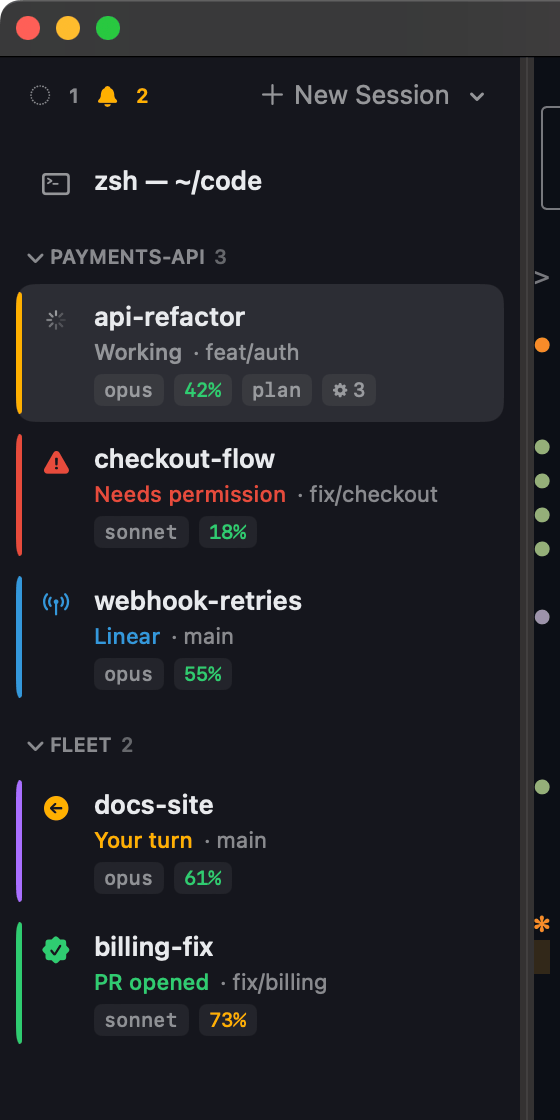
One row per session with a live indicator — working, your turn, needs permission, an MCP call in flight, a PR opened — plus model, context percentage, mode, subagent count and git branch. The colour tells you who is blocked on you before you read a word.

  • Red means a permission prompt is waiting. Amber means it is your turn.
  • Context percentage runs green → amber → red as the window fills.
  • Group by project, collapse what you are not watching, drag to reorder.
Fleet sidebar showing six sessions: api-refactor working, checkout-flow needing permission, webhook-retries on an MCP call, docs-site waiting on you, billing-fix with a PR opened

Quick Switcher

Jump to any session in three keystrokes

⌘K opens a fuzzy switcher over every open session. Type a few characters of a name and hit return — no hunting through a tab bar, no cycling windows to find the one that stopped.

  • ⌘⇧J skips the search entirely and jumps to the next session needing you.
  • ⌘1–9 focuses by position.
  • Optionally float waiting sessions to the top of the sidebar.

Command Palette

Every action on one keystroke

⌘⇧P lists everything Fleet can do — new sessions, find, clear scrollback, jump to the next session needing you, toggle the resource bar or AI summaries, run the Claude setup — each with its shortcut alongside.

  • Searchable, so you never have to remember where a setting lives.
  • Doubles as a session jump list.
Fleet command palette listing actions with their keyboard shortcuts

Search

Search every session at once

⌘⇧F searches the scrollback of every open session simultaneously and shows a match count per session. “Where did that stack trace go?” stops being six window switches.

  • Results are grouped by session, with a hit count each.
  • ⌘F still searches just the focused terminal.
Searching all Fleet sessions for “middleware”, showing 7 matches in the api-refactor session

And the rest

The parts that keep a fleet manageable

Smaller things, but they are what stop twenty sessions turning back into twenty tabs.

AI summaries

Opt in and a throttled Haiku call — reusing your existing Claude login, no extra key — writes a ≤24-character phrase under each working session. “wiring auth middleware”, not “Running…”. Plain shells show their foreground command instead.

Hover preview

Hover a row to peek inside without leaving the session you are in: the recent conversation for a Claude session, live terminal output for a shell. It reads the real transcript, not a screen scrape.

Stuck detection

A session reporting “working” that has produced no output for a while is flagged as stalled — so a crashed run stops looking like a busy one.

Groups, colours, names

Group by project, collapse, drag to reorder, and colour each session. Rename by double-clicking, or with Claude’s /rename — both are honoured, most recent wins.

Attention routing

A menu-bar extra and Dock badge count the sessions that need you, with a dropdown that jumps straight to them — even when Fleet is not focused.

Notifications

Approve and Deny buttons directly on permission prompts, click-to-focus, per-session mute, distinct sounds and granular per-state toggles. Needs a signed build — see the roadmap.

The terminal itself

Still a terminal you would use anyway

The multi-session view would be worthless on a terminal you had to tolerate.

Nerd Font bundled

MesloLGS NF ships with the app, so powerline and prompt glyphs render correctly on first launch.

Themes

Fleet Dark, Snazzy and Solarized Light — and the theme colours the whole app, not just the terminal.

Drag and drop

Drop images or files onto a session and they are pasted in for Claude to attach.

⌘-click

Open URLs and file paths straight from the scrollback.

Resource bar

Optional CPU, RAM, network and process count across the whole fleet, with a per-session breakdown.

Sensible defaults

⌥3 types #, ⌥←/→ move by word, copy-on-select, configurable bell and scrollback.

How it works

Fleet spawns the shell, so it never has to guess

The correlation between a Claude session and a sidebar row is a value Fleet put there itself — not something it infers.

  1. 1

    Fleet opens the PTY

    Every session is spawned by Fleet, which injects FLEET_SESSION=<uuid> into the shell environment and strips CLAUDE_CODE_* so it starts clean.

  2. 2

    Claude hooks stamp the id

    Bundled Node hooks write session state to ~/.claude/session-status/, stamping the same FLEET_SESSION into every file.

  3. 3

    FSEvents notices

    Fleet watches that directory. When a file changes it re-reads only what changed — no timers, no polling loop.

  4. 4

    The row updates

    The fleetSession field is the join key, so state lands on the right row immediately.

Fleet (Swift/SwiftUI)
 ├─ SessionStore     sessions, focus, groups, notifications, persistence
 ├─ Session          one PTY; owns its SwiftTerm view; injects FLEET_SESSION
 ├─ StatusWatcher    FSEvents on ~/.claude/session-status → snapshots
 ├─ Summarizer       throttled `claude -p` (Haiku) subtitles + stuck probe
 └─ ResourceMonitor  ps/nettop over Fleet's process tree

Claude Code hooks (Node, installed to ~/.claude)
 ├─ hook.js          writes <id>.json, stamped with FLEET_SESSION
 ├─ ctx_monitor.js   status line; writes <id>.meta.json (model / ctx% / …)
 └─ lib.js           shared state model

State flows one way: hooks write, Fleet reads.

The hook install is idempotent and tagged, so re-running it replaces Fleet's entries and leaves your other hooks alone — after backing up ~/.claude/settings.json.

Shortcuts

Keyboard first

Sessions

⌘T
New shell session
⌘⇧T
New Claude session
⌘W
Close focused session
⌘1–9
Focus session by position

Navigation

⌘K
Quick Switcher
⌘⇧P
Command Palette
⌘⇧F
Search all sessions
⌘⇧J
Jump to next session needing you

Terminal

⌘F
Find in focused terminal
⌘⇧K
Clear scrollback
⌘= / ⌘-
Font size bigger / smaller
⌘0
Reset font size

Roadmap

What is coming next

Fleet is early and openly so. Here is what is actually being worked on.

  • Codex rich status

    An equivalent hook and notify layer. Claude Code is the only agent with rich status today; other shells appear as basic rows.

  • Generic process state

    Build, test and dev-server state on the same row model.

  • Split panes

    Built once, removed for now. Coming back with named workspaces and a worktree launcher.

  • Signed & notarized builds

    Plus auto-update — which also unlocks native notification permissions.

Download

Get Fleet for macOS

A single app bundle. No installer, no background agent, no account — drag it to Applications and open it.

Requires
macOS 14+
Architecture
Apple silicon & Intel
Size
7.8 MB

You'll also want

  • Node on your PATH — the Claude Code hooks are Node scripts (no npm deps).
  • Claude Code, for the live status layer. Plain shells still work as basic rows.
  • One click in Settings → Claude installs the hooks. What it changes →